
How To Integrate A Verifone Credit Card Terminal Into Your POS System
In the modern retail and hospitality landscape, efficient payment processing is vital for ensuring a seamless customer experience. Businesses of all sizes rely on reliable point-of-sale (POS) systems to handle transactions quickly and securely. Integrating a Verifone credit card terminal into your POS system is one of the most effective ways to achieve this. This process ensures not only faster payments but also improved accuracy, better reporting, and enhanced customer satisfaction. Understanding how to properly integrate your Verifone terminal will help you make the most of your POS investment.
Understanding the Verifone Terminal
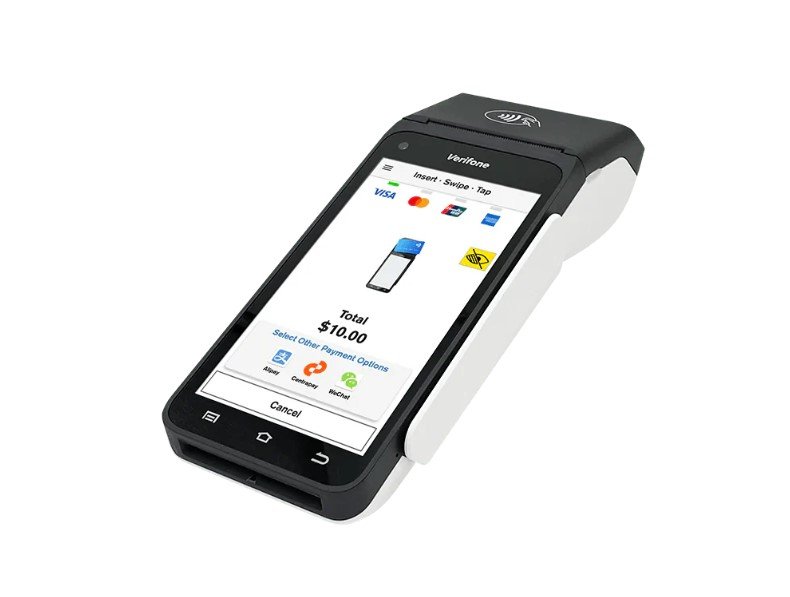
Verifone is a globally recognized brand known for developing secure and efficient payment hardware and software solutions. Their terminals are widely used in retail stores, restaurants, healthcare facilities, and service-based businesses. A Verifone terminal processes card transactions—whether through chip, tap, or swipe—by securely communicating with your POS system and payment processor.
Before you begin integration, it’s important to confirm that your POS software supports Verifone models. Popular models like the Verifone VX520, P400, and Engage series are compatible with many systems, but checking with your payment provider or POS vendor ensures a smooth setup process.
Benefits of Integration
Integrating your Verifone terminal with your POS system brings several advantages. First, it allows for automated transaction syncing, meaning data from sales, refunds, and receipts flows directly between your terminal and POS without manual input. This minimizes human error and reduces time spent reconciling daily sales.
Additionally, integration improves customer experience by speeding up checkout times. Instead of manually entering transaction amounts into both systems, integration enables instant communication between the POS and the terminal. The process is not only more efficient but also more secure, as payment data is encrypted and transferred directly to the processor.
Step 1: Prepare Your POS and Network
The first step in integrating your Verifone device is to ensure your POS system and network are properly configured. Begin by checking your internet connection since most Verifone terminals rely on Ethernet or Wi-Fi for processing transactions. A stable and secure network is crucial to prevent disconnections during payments.
If your POS operates on a local server, make sure it’s updated to the latest version. Similarly, update your Verifone terminal’s firmware to ensure compatibility with your POS software. Your payment processor or service provider can help verify if your system meets integration requirements.
Step 2: Connect the Hardware
Once your network and software are ready, it’s time to connect the Verifone terminal physically. Depending on the model, your terminal may connect via USB, Ethernet, or serial port. Ethernet connections are generally recommended for their speed and reliability.
After connecting the device, ensure the terminal powers on correctly and communicates with your POS. Many POS systems automatically detect Verifone devices once connected. If not, you may need to manually select your terminal model in the POS settings menu.
Step 3: Configure Your Payment Gateway
A payment gateway acts as the bridge between your POS and the terminal. It encrypts sensitive card information and routes it to the payment processor. During integration, you’ll need to input the credentials provided by your gateway provider into your POS system.
Once configured, perform a few test transactions to confirm that payments process smoothly and data flows correctly. If you encounter issues, check the connection settings or consult your gateway provider to troubleshoot compatibility or network concerns.
Step 4: Sync Your POS System
After the terminal and gateway are connected, it’s time to sync your POS system. This step allows both systems to communicate in real time. Every transaction processed through the Verifone terminal should automatically update the POS with transaction details, including payment type, amount, and authorization number.
Depending on your POS software, this synchronization may happen automatically, or it may require enabling specific integration options. Many modern systems offer plug-and-play functionality with Verifone devices, streamlining the setup process significantly.
Step 5: Test and Train Staff
Before going live, it’s essential to conduct multiple test transactions to ensure the integration works as expected. Test all payment methods, including chip, tap, and manual entry, and confirm that receipts print correctly. Testing helps identify any issues with communication between systems, ensuring you can resolve them before actual customer transactions occur.
Once testing is complete, train your staff on using the integrated system. Employees should understand how to initiate transactions, handle refunds, and troubleshoot common issues such as connection errors or card declines. A brief training session can go a long way in minimizing disruptions during daily operations.
Step 6: Maintain Security and Compliance
One of the key reasons businesses choose Verifone is its strong focus on payment security. Ensure that your integrated system complies with PCI DSS (Payment Card Industry Data Security Standard) guidelines. This involves using encryption, maintaining updated software, and restricting unauthorized access to sensitive data.
Additionally, keep your Verifone terminal’s firmware up to date. Regular updates often include security patches that protect against vulnerabilities. Working with your POS provider or payment processor can help you stay compliant and maintain smooth operations.
Integrating with Multi-Terminal Environments
For businesses with multiple terminals or locations, integration should be configured to support centralized reporting. Many POS systems allow you to monitor all transactions from a single dashboard, regardless of which terminal processed them. This is especially beneficial for retail chains or restaurants with several checkout stations.
When integrating multiple Verifone terminals, ensure each one has a unique identifier to prevent confusion in reporting. Proper configuration also allows for faster reconciliation and more accurate financial data management.
Collaboration with Suppliers and Support
Partnering with reliable providers ensures a smooth integration process. Working with vendors experienced in credit card terminals provides access to technical support, training resources, and maintenance services. These experts can help troubleshoot hardware or software issues quickly, minimizing downtime and ensuring your payment operations run efficiently.
Whether upgrading from a standalone setup or deploying new POS hardware, collaborating with knowledgeable suppliers makes integration simpler and more secure.
Conclusion
Integrating a Verifone credit card terminal into your POS system streamlines operations, enhances payment security, and improves the customer experience. With proper setup, testing, and maintenance, your business can enjoy faster checkouts, accurate transaction reporting, and long-term reliability in every payment processed.