
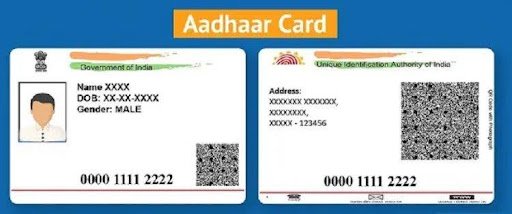
How to Change Aadhar Card Date of Birth: A Comprehensive Guide
An Aadhaar card is one of the most important identity documents in India, containing both biometric and demographic information of residents. If there is an error in your date of birth, it is important to update it as soon as possible to avoid issues while accessing banking, government, and financial services. This guide explains how to change Aadhar card date of birth through both online and offline methods and also covers the process for Aadhar card download online after the update.
Importance of an Accurate Date of Birth on Aadhaar Card
Your date of birth is a key detail used for identity verification across multiple services. An incorrect date of birth on your Aadhaar card can lead to delays or rejection while:
- Opening a bank account
- Applying for government schemes
- Completing KYC verification
- Applying for passports or other identity documents
- Accessing financial services
Keeping your Aadhaar details updated helps ensure smooth verification whenever required.
How to Change Aadhar Card Date of Birth Online
Updating your Aadhaar details online is convenient if you have the required documents and a registered mobile number.
Step 1: Visit the UIDAI Website
To start the process online, visit the official UIDAI (Unique Identification Authority of India) website. Navigating to the official portal ensures that you are using a secure and verified platform.
Step 2: Login or Register
If you already have an account, log in using your Aadhaar number and the OTP (One Time Password) sent to your registered mobile number. If you are a first-time user, you may need to register and create an account.
Step 3: Go to the Update Option
Once logged in, navigate to the Update Aadhaar Data option. This section allows users to modify various details on their Aadhaar card.
Step 4: Select Date of Birth for Update
After selecting the update option, you will see a list of all the details that can be modified on your Aadhaar card. Choose Date of Birth for editing.
Step 5: Enter the Correct Date of Birth
Enter your correct Date of Birth as per your official documents. Ensure that the date is entered in the correct format to avoid processing errors.
Step 6: Upload Supporting Documents
You need to submit valid documents that verify your date of birth. Some commonly accepted documents include:
- Birth Certificate
- School Leaving Certificate
- Passport
- Any government-issued document carrying your date of birth
Upload the required documents as instructed on the portal.
Step 7: Review and Submit Your Request
Carefully verify all the details before submitting the request. Once submitted, you will receive an acknowledgment slip containing a request number that can be used to track your application.
Step 8: Track Your Request
You can track the status of your request using the acknowledgment number provided after submission. Processing time may vary depending on verification requirements.
How to Change Aadhar Card Date of Birth Offline
If you prefer visiting a physical center, you can update your date of birth offline by following these steps.
Step 1: Locate an Aadhaar Enrollment Center
Find your nearest Aadhaar Enrollment or Update Center using the Locate an Enrolment Center facility available on the UIDAI website.
Step 2: Visit the Enrollment Center
Carry your Aadhaar card along with original supporting documents. It is also advisable to keep photocopies of the required documents.
Step 3: Fill the Aadhaar Update Form
Collect the Aadhaar Update Form at the center and carefully fill in your details, especially the Date of Birth section.
Step 4: Submit Supporting Documents
Submit the completed form along with the relevant proof of date of birth. The officials will verify your documents before processing your request.
Step 5: Complete Biometric Verification
You will be required to complete biometric authentication, including fingerprint and, if required, iris verification, to confirm your identity.
Step 6: Receive the Acknowledgment Slip
After successful submission, you will receive an acknowledgment slip containing a request number. Keep this slip safe for future reference.
Step 7: Track Your Update Status
You can monitor your application status online using the acknowledgment number or contact the Aadhaar support center for updates.
Documents Required for Date of Birth Update
Before initiating the update request, keep the following documents ready:
- Birth Certificate
- School Leaving Certificate
- Passport
- Government-issued identity document showing date of birth
Submitting valid documents helps speed up the verification process.
Aadhar Card Download Online
Once your Aadhaar details have been successfully updated, you can download the latest version of your Aadhaar card.
Step 1: Visit the UIDAI Website
Go to the official UIDAI website.
Step 2: Select Download Aadhaar
Click on the Download Aadhaar option available on the homepage.
Step 3: Enter Required Details
Provide your Aadhaar number, captcha code, and other required information.
Step 4: Verify Using OTP
An OTP will be sent to your registered mobile number. Enter the OTP to complete verification.
Step 5: Download the Updated Aadhaar Card
After successful verification, you can Aadhar card download online in PDF format. The downloaded file is password-protected, and the password is typically the combination specified for Aadhaar PDF access.
Tips for a Smooth Aadhaar Update Process
To avoid delays during the update process, keep these best practices in mind:
Ensure Document Accuracy
Make sure all supporting documents clearly display your correct date of birth.
Check Your Registered Mobile Number
A registered mobile number is required for OTP-based verification during online updates.
Review All Details Carefully
Verify every detail before submitting the update request to avoid additional correction requests.
Keep the Acknowledgment Number Safe
The acknowledgment number is essential for tracking your application until the update is completed.
Conclusion
Changing the date of birth on your Aadhaar card is a crucial step in maintaining accurate records and ensuring smooth access to services. Whether you choose the online or offline method, it is essential to follow the proper procedures to avoid issues in the future. Always keep your documents ready and ensure that the submitted details are correct. By following the steps outlined in this guide, you will be well-prepared to update your Aadhaar card information efficiently. Remember, an up-to-date Aadhaar card plays a vital role in your identity verification for accessing various governmental and financial services.