
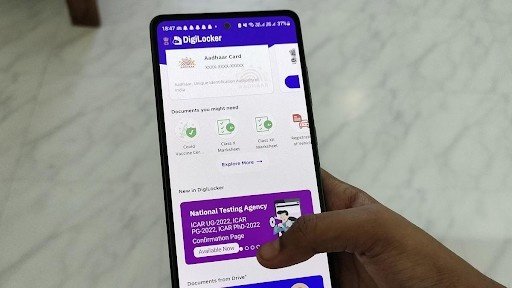
How to Access and Use Passport in DigiLocker for Travel Verification
In today’s digital age, the use of technology has made document management more convenient than ever. DigiLocker, an initiative by India’s Ministry of Electronics and Information Technology (MeitY), has transformed how citizens store and access important documents securely. Among the many features DigiLocker offers, accessing your passport in DigiLocker is one of the most beneficial, particularly for travel verification purposes. This article will walk you through the steps to access and use your passport in DigiLocker while also providing insights into other useful features such as checking active loans on your PAN card.
What is DigiLocker?
DigiLocker is a cloud-based digital service platform aimed at reducing the reliance on physical documents. By linking your Aadhaar card, DigiLocker enables seamless storage and retrieval of identity, educational, and financial documents securely. The goal is to eliminate the need to carry hard copies and to make official processes easier for individuals and government agencies alike.
Since the passport is one of the most crucial documents for international travel, having it stored digitally in DigiLocker ensures quick access anytime, anywhere.
What is the Purpose of Storing Passport in DigiLocker?
Your passport serves as an official document for travel verification and proof of identity. Having it digitally stored on DigiLocker provides several benefits:
- Convenience: You can access your passport anytime without needing physical copies.
- Security: DigiLocker uses encryption to ensure your data is safe from unauthorized access.
- Government Recognition: DigiLocker documents are treated as legally valid as physical copies by government authorities.
- Backup Option: In instances where your physical passport is unavailable or misplaced, the digital version can serve as proof in emergencies.
With an active DigiLocker account, travelers can submit their digital passport on online portals for visa applications, hotel bookings, or even during airport check-ins requiring ID verification.
How to Register and Access DigiLocker
Before learning how to store and access your passport in DigiLocker, let’s understand how to set up an account:
Registration
- Visit DigiLocker website or app: Visit https://www.digilocker.gov.in or download the mobile app available on Android and iOS platforms.
- Sign up using mobile number: Sign up using your mobile number and verify it using the OTP sent to your phone.
- Link Aadhaar card: Link your Aadhaar card for enhanced validity and access to government records.
Login
- Use login credentials: Use your mobile number or Aadhaar ID to log in.
- Ensure Aadhaar sync: Existing users should ensure their DigiLocker account is synced with Aadhaar for wider access.
How to Access Passport in DigiLocker
Once your DigiLocker account is set up, here’s how you can retrieve your passport in DigiLocker for travel verification:
Step 1: Log In to DigiLocker
Use your registered mobile number, username, or Aadhaar card credentials to log in to the DigiLocker platform.
Step 2: Find the Issuer
On the dashboard, locate the Issuers section, which lists all the government agencies and organizations integrated with DigiLocker. Select Ministry of External Affairs since passports are issued by the Passport Seva Portal, part of this ministry.
Step 3: Search for Passport
Under the list of services provided by the Ministry of External Affairs, click on the section for Passport. You will need to provide your passport number and other verification details prompted by the system to fetch your digital copy.
Step 4: Sync Your Passport
After verifying your credentials, the platform will fetch the digital version of your passport. It will sync this document to your DigiLocker account, enabling easy access whenever required.
Step 5: Usage
Your passport will now be stored safely in DigiLocker under the My Documents section. You can download the document or share it digitally through the DigiLocker platform using the Share option. This feature comes in handy during visa applications, airport security checks, or other travel-related processes.
Benefits of Accessing Passport in DigiLocker for Travel Verification
Immediate Access
Having your passport digitally available in DigiLocker allows you to retrieve it in seconds, especially in urgent situations, such as last-minute tickets or document submissions.
Paperless Verification
Digital passports uploaded to DigiLocker are accepted by government agencies, removing the need to carry paper documents during your travels.
Enhanced Security
Since DigiLocker uses advanced encryption protocols, the risk of compromising the sensitive data on your passport is minimal.
Accessible Anytime, Anywhere
Whether you’re traveling domestically or internationally, you can access your passport on DigiLocker even if you forget to carry the physical copy.
How to Check Active Loan on PAN Card in DigiLocker
Beyond storing passports, DigiLocker allows users to access and verify financial information, such as check active loan on pan card. Here’s how you can use DigiLocker for this purpose:
Step 1: Link PAN Card to DigiLocker
Ensure your DigiLocker account is linked to your PAN card details. This can be done from the My Profile section of your account by verifying your PAN number.
Step 2: Search for Financial Services Provider
In the Issuers section, look for financial institutions or government agencies such as the Income Tax Department to access PAN-related information.
Step 3: Retrieve Loan Details
Navigate to active loans tied to your PAN card. DigiLocker provides an official platform to view financial standings, helping you manage loans efficiently.
This feature is particularly helpful for travelers who need to confirm their financial background when applying for visas or traveling abroad.
Additional Features of DigiLocker for Travelers
Apart from storing your passport in DigiLocker, the platform offers several other features to simplify travel processes:
Storage for Other Identification Documents
Store your driving license, Aadhaar card, and voter ID in DigiLocker to centralize all your identification documents.
Integration with International Services
DigiLocker is gradually gaining recognition on global platforms, allowing Indian travelers to use digitally stored passports for international verification.
Shareable Links for Documents
The platform allows you to share secure document links directly with embassies, hotels, or travel agencies via email, reducing paperwork and time spent on physical submissions.
FAQs
Is the passport stored in DigiLocker legally valid?
Yes, the digital passport retrieved via DigiLocker is as valid as the physical copy. It can be used for official purposes, including travel verification.
How does DigiLocker ensure security?
DigiLocker encrypts user data and requires Aadhaar-based or mobile-based verification to ensure secure access and retrieval of documents.
Can I update my passport details in DigiLocker?
While you cannot directly update details in DigiLocker, any changes made in the Passport Seva system will automatically fetch an updated version when synced.
Conclusion
Accessing and using your passport in DigiLocker for travel verification is an incredibly convenient tool for travelers in the digital era. The platform’s functionality ensures security, legality, and ease, making it indispensable for both domestic and international trips. Whether you’re applying for a visa, verifying your identity at airport security, or simply looking for a secure way to store official documents, DigiLocker serves as a one-stop solution.
Moreover, DigiLocker’s additional features, such as the ability to check active loans on PAN card, make it a valuable tool beyond document storage. By integrating this technology into your day-to-day life, you can simplify processes, avoid unnecessary hassles, and ensure that all your vital documents are readily available with just a few clicks.
Embrace the ease and reliability DigiLocker brings, and enjoy hassle-free travel with your passport and other essential documents digitally safeguarded. The future of document storage and verification is here!